Tampilkan postingan dengan label official. Tampilkan semua postingan

Download Official iOS message app Imessage for Android for free

Rabu, 15 Januari 2014

There are plenty of cross-platform messaging apps available, however there are some that are still limited to a single mobile operating system. In this case, one of the apps that is still limited is iMessage, which is available on iOS devices. Or more to the point for today, has previously only been available for iOS devices. A new iMessage app has recently landed in the Play Store — but there is a catch.


To start, the iMessage app is not from Apple. This makes it an unofficial release, but there is still a bit more to the story. The warning comes by way of Jay Freeman (saurik) who has said that all of the message data is being handled through a server in China. Freeman has said that as far as he can tell, “the way it works is that the client does directly connect to Apple, but the data is all processed on the developer’s server in China.”

This means that someone using this app will have their message sent from their device to a third-party server in China (which makes it appear to have come from an Apple device) and then sends the message. Basically, those using the app should consider themselves warned about how the app is actually handling these messages. And to further that, you will be required to have an Apple ID, which means giving up a username and password, but remember — those accounts often have other more personal details attached.

The other aspect here is that Apple may get wise to this and figure out a way to shut them down. Needless to say, the iMessage app for Android is free so you would not be losing out on the app purchase. As for the app itself, the developer has said the primary purpose is to allow everyone to be able to chat using iMessage for free. Otherwise, the app allows the user to send and receive messages and offers goodies such as a read and typing status notifications.

Anyway, those warnings and findings aside, those who want to move forward and begin chatting with their iOS using friends can use this Google Play Store link to download the app.
Read More..

How to Update Galaxy Win I8552 with Android 4 1 2 XXAML3 Jelly Bean Official Firmware

Sabtu, 04 Januari 2014

Samsung Galaxy Win (GT-I8552) with Dual SIM card support also known as Galaxy Grand Quattro has received the latest Android 4.1.2 Jelly Bean update with firmware build number I8552XXAML3. The new official firmware is now available for download in India as an Over-The-Air (OTA) update.

Firmware details
PDA: I8552XXAML3
CSC: I8552ODDAMK3
MODEM: I8552DDAMI1
Version: Android 4.1.2
Build date: Dec 18, 2013
Regions: India

Samsung Galaxy Win I8552 users who missed the OTA update notification or unable to access the update over Samsung KIES, and those who are residing outside India can now download and install the same manually, using our step-by-step guide.

Pre-requisites
1. Install USB Drivers for Samsung Galaxy Win on the computer.
2. Enable USB Debugging Mode on the phone by navigating to Settings >> Developer Options.
3. Make a backup of all your important data before following the guide.
4. The Galaxy Win should be factory unlocked and not locked to any particular carrier.
5. Ensure the battery of the phone is charged more than 80 percent.
6. The Android 4.1.2 XXAML3 Jelly Bean firmware is compatible only with the Samsung Galaxy Win with model number GT-I8552. Applying this to any incorrect variant might brick the device. Verify the model number of the Galaxy Win by navigating to Settings >> About Phone.

Files Required
1. Android 4.1.2 XXAML3 Jelly Bean Firmware (Mirror Link 1, Link 2) for Galaxy Win I8552
2. Odin 3.07

Steps to Update Galaxy Win I8552 with Android 4.1.2 XXAML3 Jelly Bean Firmware
Step 1: Extract Firmware zip file using WinRAR/7-Zip/WinZip or any other extracting tool, you will get a .tar.md5 file and some other files (optional).
Step 2: Extract Odin zip file and you will get Odin3 v3.07.exe along with few other files.
Step 3: Switch off the Galaxy Win.
Step 4: Boot the device into Download Mode by pressing and holding Volume Down, Home and Power buttons together until a construction Android robot icon with a warning triangle appears on screen. Now press the Volume Up button to enter Download Mode.
Step 5: Run Odin on the computer as an Administrator.
Step 6: Connect the Galaxy Win to the computer using USB cable while it is in the Download Mode. Wait until Odin detects the device. When the device is connected successfully, the ID: COM box will turn to light blue with the COM port number. Additionally, the successful connected will be indicated by a message saying Added.

Note: If the Added message does not appear, then try re-install USB drivers or changing the port on the computer.

Step 7: Select the following files in Odin from extracted I8552XXAML3 firmware folder:
  • Click the PDA button and select the .tar.md5 file.
  • Click the Phone button and select file with MODEM in its name. Ignore if there is no such file.
  • Click the CSC button and select file with CSC in its name. Ignore if there is no such file.
  • Click the PIT button and select the .pit file. Ignore if there is no such file.
    Step 8: In Odin, enable Auto Reboot and F. Reset Time checkboxes. Also, ensure the Re-Partition checkbox is chosen only if a .pit file was chosen in the previous step.
    Step 9: Verify everything suggested in Step 7 and Step 8 is done correctly. Then hit the Start button to begin the installation process.
    Step 10: Once the installation process completes, your phone will restart and soon you will see a PASS message with green background in the left-most box at the very top of the Odin. You can now unplug the USB cable to disconnect it from the computer.

    Samsung Galaxy Win I8552 should be now updated with official Android 4.1.2 XXAML3 Jelly Bean. Head over to Settings >> About Phone to verify the software version running on the device.

    Note: If Galaxy Win I8552 stuck at booting animation after Step 10 then go to recovery mode (press and hold the Volume Up, Home and Power buttons together) and perform Wipe data/Factory Reset and Wipe Cache Partition task before selecting reboot system now function. In recovery mode use Volume keys to navigate between options and Power key to select the option. Please note, performing wiping task will erase your device internal memory data and not external SD card data.

    Click here to know How to Root Galaxy Win I8552 running on Android 4.1.2 Jelly Bean firmware.
    Read More..

    Thor The Dark World The Official Game v1 0 0 Apk Data Android

    Kamis, 12 September 2013

    Thor: The Dark World - The Official GameThor: The Dark World - The Official Game

    Thor: The Dark World - The Official Game of the movie is coming this fall!

    Take the role of Thor! Lead Asgardian forces in the exciting and varied missions against Marauders and Dark Elves and save the world!


    If you aren’t in the Comic Con know, gameloft revealed Thor: The Dark World - The Official Game over the weekend, based on the movie! In the game, Thor must restore order to the Nine Worlds and lead Asgardian forces in over 100 exciting missions.

    Thor: The Dark World – The Official Game will allow fans of the franchise to play as one of Marvel’s most iconic Super Heroes in a game of epic scope and beauty.


    Checkout the first screenshots featuring Thor: The Dark World - The Official Game below!

    Thor: The Dark World - The Official Game
    Thor: The Dark World - The Official Game

    Thor: The Dark World - The Official Game
    Thor: The Dark World - The Official Game

    Thor: The Dark World - The Official Game
    Thor: The Dark World - The Official Game

    The Game will be provided as soon as it is released on the stores for Android Phones, iPhone and iPads.


    Read More..

    Iron Man 3 – The Official Game v1 0 3 APK

    Jumat, 19 Juli 2013

    Iron Man 3 – The Official Game v1.0.3 APK


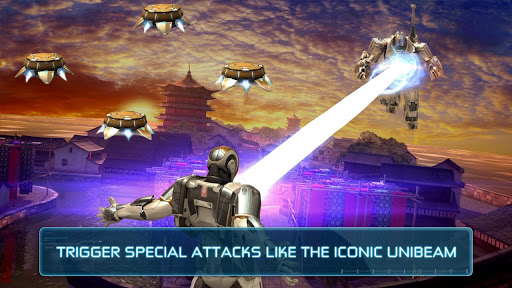
    Become billionaire Tony Stark as Iron Man in this free, fast-paced, endless runner, the official game of the upcoming movie!


    Iron Man 3 – The Official Game
    play.google.com.GloftIMHM

    After the events of Iron Man 3, Tony has become a peacekeeper, but new threats emerge regularly all around the globe and Iron Man is the only one who can take care of them.
    Get ready for intense action in this free, addictive, endless 3D runner!

    THE OFFICIAL GAME OF THE MOST AWAITED SUPERHERO MOVIE, FOR FREE!
    Fight against rising A.I.M. forces around the world during amazing runs
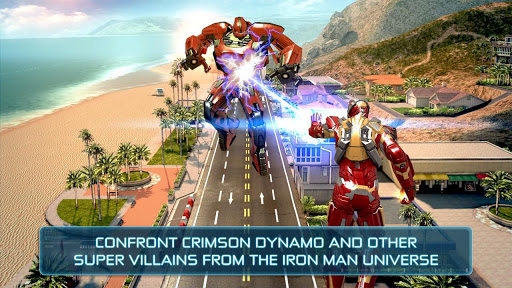
    Discover 3 different locations offering endless, self-generating levels: Malibu Shores, New York City and China
    Confront 4 epic villains from the Iron Man comics: Crimson Dynamo, Ezekiel Stane, Living Laser and the mighty M.O.D.O.K.

    BECOME IRON MAN AS NEVER BEFORE!
    Complete various missions in fast-paced flying battles and epic one-on-one confrontations
    Unleash Iron Man’s superpowers with amazingly responsive swipe controls
    Enjoy an outstanding 3D world with cutting-edge graphics and animations

    COMMAND STARK INDUSTRIES
    Research and develop up to 18 suits from the different movies (MARK II, MARK 42, Silver Centurion, etc.)
    Upgrade your armours and powers in the research Lab to wipe out your enemies

    For all fans of superhero games, runner games, action games, arcade games, Marvel games, and for all of those who want to fight as Iron Man during amazing and intense free runs.
    Iron Man 3 – The Official Game from the upcoming Marvel movie is a free-to-play game, but if you wish, you can enrich your experience by purchasing game items to boost your progress!

    What’s in this version: (Updated : Jun 15, 2013)
    Burn up your enemies with 2 new armors: Hot Rod and Romeo!
    Quicker access to the leaderboard
    Improved Armor Tree interface
    General bug fixes and system optimizations
    Required Android O/S : 2.3+

    Screenshots :


    SD DATA 
    Read More..